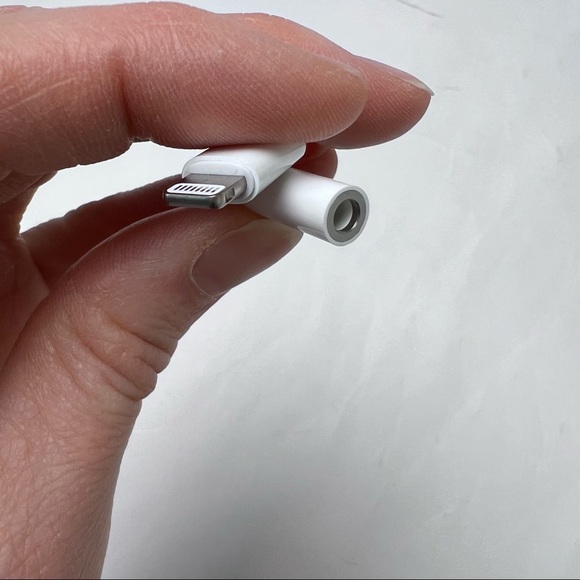
Apple Headphone Jack Adapter Target. Only ships with $35 orders. Not only is the company no longer selling iphones with headphone jacks, as theyve removed the iphone se and 6s from their website, but theyre no longer including a lightning to 3.5mm headphone jack adapter with the purchase of a new 2018 iphone.
Apple Cell Phones & Accessories Never Used Apple from poshmark.com
Apple lightning to 3.5mm headphone adapter. The pcb has a switching chip that switches between connecting the headphone adapter to the phone by default, and then disconnecting it and connecting the lightning jack when something. The verge also reports that the company is discontinuing the.
Compatible With Lightning Audio Headphones.
Shop our great selection of electronics & save. Its official:apple lightning to 3.5 mm headphone jack adapter. Get the latest in electronics.
Listen To Music And Charge At The Same Time.
Apple lightning to 3.5mm headphone adapter. Insten 3.5mm jack airplane ear headphones adapter, black. Choose from same day delivery, drive up or order pickup.
Compatible With Apple Lightning To 3.5 Mm Headphone Jack Adapter.
Now, you need to pay for this accessory separately. Find a range of headphones at low prices at target. Belkin lightning audio + charge rockstar.
Find A Apple Lightning To 3.5Mm Headphone Jack Adapter (Mmx62Am/A) At Staples.ca.
Free delivery on orders over $80. Free click + collect on all orders over $20. In order to connect sleepphones ® classic headphones to such a device, you will need a 3.5mm to lightning adapter.
I'm Running 12.1.1 And I Can't Seem To Activate Face Time And Imessages On My Ipad Too.
Choose from same day delivery, drive up or order pickup plus free shipping on orders $35+. Apple lightning to 3.5mm headphone adapter. Read reviews and buy apple lightning to 3.5mm headphone adapter at target.
How To Connect Rj45 Pin . Here we offer some clarification of the various 'standards'. (transmitter) pins are connected to the corresponding rx (receiver) pins, plus to plus and minus to minus. RJ45 Pinout & Wiring Diagrams for Networking BDFIX from bdfixforum.blogspot.com Here we offer some clarification of the various 'standards'. 1st, issue " show interface " command to verify the ethernet port status. Rj45 (8pin) terminal or printer cable configuration.
How To Connect Macbook Air To Mac Desktop . Going wireless is a great idea in a situation like this, as it gives you one less cable to plug in any time you want to move things around (also check out our roundup of the best. This is very essential whenever you log from another machine to mac. How To Format Sd Card On Mac Air All About Information from fattah.bestvacuumcleanerr.com Since your said your macbook air is from 2011, it should have the thunderbolt, and you can connect the two computers using the following instructions: Microsoft remote desktop (rdp) for mac is a useful way to work with windows apps and resources. How do i connect two monitors to my macbook air 2020?
Can I Connect Lan To Mobile . Place a second router that comes with an rj45 cable from the main router's lan port to the second router lan port. The users can easily get around the speed caps on unlimited mobile data plans. WiFi Band Dual 5G Wireless Adapter, Bluetooth WiFi USB from exo-l.com That is why you can get a tether connected to the router with the ethernet cable to ensure perfect results. How can i share my mobile broadband connection? Usually it is the router which receives the internet connection cable from your internet service provider.


Comments
Post a Comment