Microsoft Wireless Display Adapter Youtube. The adapter also requires power through. App based video (youtube, netflix, amazon) cant play when connected to the adapter
Review Microsoft Wireless Display Adapter GadgetGear.nl from www.gadgetgear.nl
This microsoft 4k wireless display adaptor allows you to mirror the display on your microsoft surface model laptop to a bigger screen. Jika memiliki microsoft 4k wireless display adapter, berikut adalah beberapa hal lain untuk dicoba: App based video (youtube, netflix, amazon) cant play when connected to the adapter
Connect Your Windows Pc To Your Adapter.
The adapter also requires power through. Select personalization and enter the name you want. Change how the adapter is connected.
Here We Provide A Feature Comparison Between Airtame 2 And Widi.
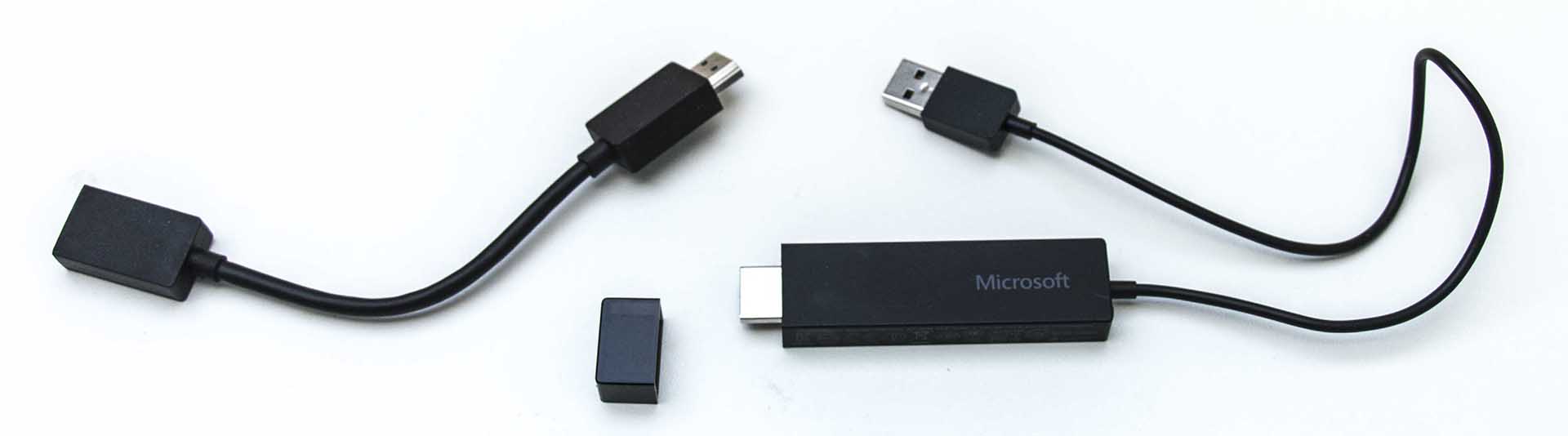
The wireless display adapter has a usb and a hdmi connector which you plug both into the hdtv or computer monitor (which means the device needs to offer both). We identified it from reliable source. This microsoft 4k wireless display adaptor allows you to mirror the display on your microsoft surface model laptop to a bigger screen.
Airtame And The Microsoft Widi (Wireless Display Adapter) Offer Wireless Screen Sharing.
Please note that all technical specifications are taken directly. If youve turned on hdcp with the microsoft wireless display adapter app, try turning it off. If the display doesnt have a powered usb port, you can use a usb smartphone charger and plug in your microsoft wireless display adapter into it, so that it gets the power it needs.
Open The Microsoft Wireless Display Adapter App.
If you have a microsoft 4k wireless display adapter, here are some other things to try: I can watch videos on the extended display, but say streaming youtube and simply moving the mouse onto the second screen over top of the video while it is playing causes the audio to skip and so does the video. See screenshots, read the latest customer reviews, and compare ratings for microsoft wireless display adapter.
The Tv/Monitor Should Not Be More Than 7 Meters Or 23 Feet Away From Your Windows 10 Computer Or Device.
Download this app from microsoft store for windows 10, windows 8.1, windows 10 team (surface hub), hololens, xbox one. Microsoft wireless display adapter app may be installed from windows store in traditional chinese, simplified chinese, dutch, danish, english, french, french canadian, german, italian, japanese, korean, portuguese portugal,. Jika memiliki microsoft 4k wireless display adapter, berikut adalah beberapa hal lain untuk dicoba:
How To Connect Rj45 Pin . Here we offer some clarification of the various 'standards'. (transmitter) pins are connected to the corresponding rx (receiver) pins, plus to plus and minus to minus. RJ45 Pinout & Wiring Diagrams for Networking BDFIX from bdfixforum.blogspot.com Here we offer some clarification of the various 'standards'. 1st, issue " show interface " command to verify the ethernet port status. Rj45 (8pin) terminal or printer cable configuration.
How To Connect Macbook Air To Mac Desktop . Going wireless is a great idea in a situation like this, as it gives you one less cable to plug in any time you want to move things around (also check out our roundup of the best. This is very essential whenever you log from another machine to mac. How To Format Sd Card On Mac Air All About Information from fattah.bestvacuumcleanerr.com Since your said your macbook air is from 2011, it should have the thunderbolt, and you can connect the two computers using the following instructions: Microsoft remote desktop (rdp) for mac is a useful way to work with windows apps and resources. How do i connect two monitors to my macbook air 2020?
Can I Connect Lan To Mobile . Place a second router that comes with an rj45 cable from the main router's lan port to the second router lan port. The users can easily get around the speed caps on unlimited mobile data plans. WiFi Band Dual 5G Wireless Adapter, Bluetooth WiFi USB from exo-l.com That is why you can get a tether connected to the router with the ethernet cable to ensure perfect results. How can i share my mobile broadband connection? Usually it is the router which receives the internet connection cable from your internet service provider.


Comments
Post a Comment